
WhatsApp API: Send a List of Options and Read the Reply
There are two ways to send a list of options on WhatsApp and read what the user picked. The official way is the WhatsApp Cloud API: you send an interactive list message ("type": "interactive" with "interactive": { "type": "list" }) to the /messages endpoint, and the user’s choice arrives at your webhook as interactive.list_reply, with the id and title of the row they tapped. The unofficial way is the whatsapp-web.js library, which logs in as your own WhatsApp account; its list messages no longer work, so with it you send a poll instead. This post covers the Cloud API first.
The Cloud API part was checked against Meta’s interactive list messages documentation in November 2026, which uses Graph API v27.0. The whatsapp-web.js part was checked against the source of version 1.34.8.
Send a list message with the WhatsApp Cloud API
Send a POST request to https://graph.facebook.com/v27.0/<PHONE_NUMBER_ID>/messages, where <PHONE_NUMBER_ID> is your business phone number’s ID from the WhatsApp Manager or the app dashboard, with an Authorization: Bearer <ACCESS_TOKEN> header:
curl -X POST "https://graph.facebook.com/v27.0/$PHONE_NUMBER_ID/messages" \
  -H "Authorization: Bearer $ACCESS_TOKEN" \
  -H "Content-Type: application/json" \
  -d '{
    "messaging_product": "whatsapp",
    "recipient_type": "individual",
    "to": "919XXXXXXXXX",
    "type": "interactive",
    "interactive": {
      "type": "list",
      "header": { "type": "text", "text": "Fruit sale" },
      "body": { "text": "Here is our list of products at 50% off." },
      "footer": { "text": "Offer ends Sunday" },
      "action": {
        "button": "View products",
        "sections": [
          {
            "title": "Fruits",
            "rows": [
              { "id": "apple", "title": "Apple", "description": "1 kg box" },
              { "id": "mango", "title": "Mango", "description": "Alphonso, 1 dozen" },
              { "id": "banana", "title": "Banana" }
            ]
          }
        ]
      }
    }
  }'
The user sees the body text and a button labelled “View products”. Tapping it opens the list, and they can choose one row. Give every row an id your code understands (apple, order_123_express): that is what comes back to you, so you don’t have to match on the visible title.
to is the user’s number with the country code and no +. A list is a free-form (service) message, so you can only send it while the user’s 24-hour customer service window is open, that is, within 24 hours of their last message to you. Outside that window Meta’s send messages guide says only approved template messages can be sent.
List message limits
From Meta’s documentation for v27.0:
| Part | Limit |
|---|---|
| Sections | 1 to 10, each with a title |
| Rows | Up to 10 in total, across all sections |
| Header (optional, text only) | 60 characters |
| Body | 4,096 characters |
| Footer (optional) | 60 characters |
| Button label | 20 characters |
| Section title, row title | 24 characters each |
| Row description (optional) | 72 characters |
| Row ID | 200 characters |
If you need more than 10 options, split them into steps (first a category, then the items in it) or send a link to a page instead.
Read the user’s reply in the webhook
When the user picks a row, WhatsApp sends a messages webhook to the callback URL you set up for your app. The message inside it has "type": "interactive", and its interactive object looks like this:
{
  "from": "919XXXXXXXXX",
  "id": "wamid.XXXX",
  "timestamp": "1763280000",
  "type": "interactive",
  "context": { "from": "<your business number>", "id": "wamid.<the list message you sent>" },
  "interactive": {
    "type": "list_reply",
    "list_reply": {
      "id": "mango",
      "title": "Mango",
      "description": "Alphonso, 1 dozen"
    }
  }
}
list_reply.id is the row id you sent, title and description are the row’s text, and context.id is the ID of your list message, so you can tell which list the answer belongs to if you sent several.
Here is a small Node.js (18 or newer) server with Express that verifies the webhook, reads the choice and replies to it:
const express = require("express");

const { ACCESS_TOKEN, PHONE_NUMBER_ID, VERIFY_TOKEN } = process.env;
const app = express();
app.use(express.json());

// Meta calls this once when you add the callback URL
app.get("/webhook", (req, res) => {
  if (req.query["hub.mode"] === "subscribe" && req.query["hub.verify_token"] === VERIFY_TOKEN) {
    return res.send(req.query["hub.challenge"]);
  }
  res.sendStatus(403);
});

app.post("/webhook", async (req, res) => {
  res.sendStatus(200); // answer quickly, then do the work

  for (const entry of req.body.entry ?? []) {
    for (const change of entry.changes ?? []) {
      for (const msg of change.value?.messages ?? []) {
        if (msg.type === "interactive" && msg.interactive.type === "list_reply") {
          const { id, title } = msg.interactive.list_reply;
          console.log(`${msg.from} picked ${id}`);
          await sendText(msg.from, `You've selected ${title}`);
        }
      }
    }
  }
});

async function sendText(to, body) {
  await fetch(`https://graph.facebook.com/v27.0/${PHONE_NUMBER_ID}/messages`, {
    method: "POST",
    headers: { Authorization: `Bearer ${ACCESS_TOKEN}`, "Content-Type": "application/json" },
    body: JSON.stringify({ messaging_product: "whatsapp", to, type: "text", text: { body } }),
  });
}

app.listen(3000);
The user’s reply opens (or refreshes) the 24-hour window, so the text reply above is allowed.
The unofficial way: whatsapp-web.js
whatsapp-web.js runs WhatsApp Web in a headless browser and logs in as your own account when you scan a QR code. It is not the WhatsApp Business API, and WhatsApp can restrict numbers that automate too much. I first showed it in a video on WhatsApp automation with JavaScript, and this post began as an answer to a question in its comments:
https://www.youtube.com/watch?v=iovH8bwSCWY
The original version of this post sent a List with whatsapp-web.js and read the answer from the list_response message type:
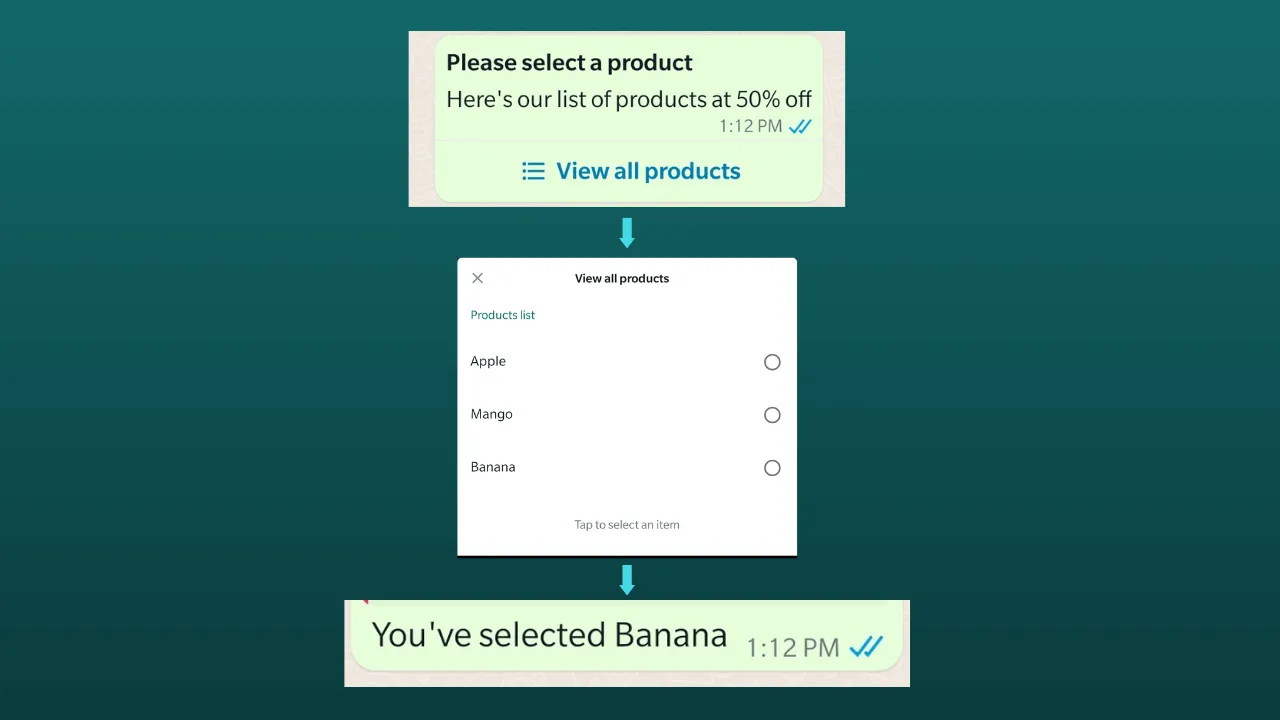
That no longer works. The library’s README for version 1.34.8 marks “Send lists” (and “Send buttons”) as deprecated and unsupported. The List class is still in the package, but don’t build on it.
The closest thing that still works is a poll: send a Poll, and listen for the vote_update event, which says who voted and which option they chose.
const { Client, LocalAuth, Poll } = require("whatsapp-web.js");
const qrcode = require("qrcode-terminal");

const CHAT_ID = "919XXXXXXXXX@c.us"; // a contact, or a group ID ending in @g.us

const client = new Client({ authStrategy: new LocalAuth() });

client.on("qr", (qr) => qrcode.generate(qr, { small: true }));

client.on("ready", async () => {
  await client.sendMessage(
    CHAT_ID,
    new Poll("Which product do you want at 50% off?", ["Apple", "Mango", "Banana"])
  );
});

client.on("vote_update", async (vote) => {
  if (vote.selectedOptions.length === 0) return; // they removed their vote
  const choice = vote.selectedOptions[0].name;
  await client.sendMessage(vote.voter, `You've selected ${choice}`);
});

client.initialize();
Install it with npm install whatsapp-web.js qrcode-terminal (version 1.34.8 needs Node.js 18 or newer). Polls are single choice by default; pass { allowMultipleAnswers: true } as the third argument to Poll to allow several. Each entry in vote.selectedOptions has the option’s name and its localId, its position in the array you sent (0 for Apple). For more with this library, see how to add participants to a WhatsApp group with whatsapp-web.js.
Which one should you use?
Use the Cloud API for anything customers rely on: it is Meta’s supported API, and lists and reply buttons are part of it. It needs a WhatsApp Business account, a phone number registered with the API and a public HTTPS webhook. Use whatsapp-web.js only for personal scripts and experiments on your own account, where a poll is good enough.
FAQ
How many options can a WhatsApp list message have? Up to 10 rows in total, spread over at most 10 sections, according to Meta’s documentation for Graph API v27.0. Row titles can be 24 characters and descriptions 72.
Where do I get the option the user selected?
In the messages webhook: the message has type: "interactive" and interactive.type: "list_reply", and interactive.list_reply.id is the id of the row they chose, with its title and description beside it.
Can I send a list message to someone who hasn’t messaged me? No. Lists are free-form messages, so they can only go out within 24 hours of the user’s last message to you. To start a conversation, send an approved template message first.