
Web Scraping with VBA: Selenium Example (2026)
How do you do web scraping with VBA? Use Selenium VBA (the SeleniumBasic wrapper) when the page needs a real browser, for example when content loads after a click or scroll. When the data is in the page HTML or comes from a JSON API, a plain XMLHttpRequest is much faster. The macros below scrape a blog and an online shop with Selenium, then repeat the shop with its API.
Note (November 2026): the macros are unchanged from the original and I did not re-run them in Excel for this update. Websites change their HTML, so the class names and the shop’s URLs may no longer match; treat them as patterns and adjust the selectors. The Selenium setup (SeleniumBasic plus a ChromeDriver that matches your Chrome version) is in the first post of this series.
Selenium or XMLHttpRequest for scraping in VBA?
| Selenium VBA | XMLHttpRequest | |
|---|---|---|
| Needs | SeleniumBasic and a matching browser driver | Nothing to install |
| Handles JavaScript-rendered pages | Yes | No |
| Speed | Slow, opens a browser | Fast |
| Use it when | Content appears after clicks, scrolling or login | The data is in the HTML or in a JSON API |
Try the HTTP route first. See HTTP requests in Excel VBA for GET and POST examples and Parse HTML in Excel VBA for reading the HTML you get back.
This post is a continuation of Browser automation in Excel using Selenium VBA. Have a look at that post first as it explains how to get started. This post is all about how to scrape website using selenium VBA in Excel and different methods that are used to scrape data and best practices for scraping.
Scrape a blog
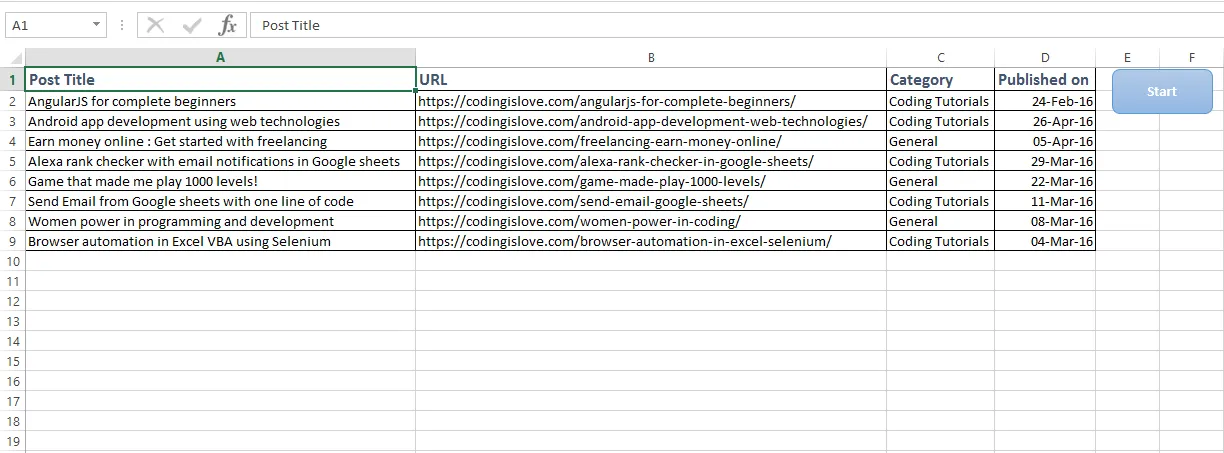
Lets get started with a simple example. Lets scrape posts data from this blog codingislove.com. We’ll be scraping post title, URL, Category and Published date.
Scraped data looks like this :
Simple goal, Go to codingislove.com and scrape data. Lets have a look at code once.
Public Sub scrapeCIL()
Dim bot As New WebDriver, posts As WebElements, post As WebElement, i As Integer, mysheet As Worksheet, keys As Selenium.keys
bot.Start "chrome", "/"
bot.Get "/"
Set posts = bot.FindElementsByTag("article")
i = 2
Set mysheet = Sheets("Coding is Love")
bot.Mouse.moveTo bot.FindElementByClass("pagination")
'Selenium can only view visible elements. I have added animations to my homapage which will reveal posts only when scrolled to them. So scroll to bottom of the page first then find elements.
For Each post In posts
mysheet.Cells(i, 1).Value = post.FindElementByClass("entry-title").Text
mysheet.Cells(i, 2).Value = post.FindElementByClass("entry-title").FindElementByTag("a").Attribute("href")
mysheet.Cells(i, 3).Value = post.FindElementByCss(".first-category > a").Text
On Error Resume Next 'Sticky posts don't have published date so ignore the error if not found
mysheet.Cells(i, 4).Value = post.FindElementByClass("published").Text
On Error GoTo 0 'Add back error handling
i = i + 1
Next
bot.Quit
End Sub
Code explanation
- First, we start a web driver, go to codingislove.com homepage.
- Extract all posts to
postselement usingFindElementsByTagmethod as all posts have a HTML tag namedarticlein this blog. We can look up HTML elements of a page using Right click > Inspect element in chrome. I’ve definedpostsas WebElements.FindElementsByTagmethod extracts all elements with specified tag. - mysheet is defined as a worksheet, set it to sheetname to which date needs to be extracted. In this case my sheet name is
Coding is Love - Now loop through each post in
postsand extract post data to mysheet. I’ve used an integerito loop through cells in sheet. - Post title element has a class name of
entry-title, post date has a class name ofpublishedso we useFindElementByClassmethod to extract them. - Post URL is available in
hrefattribute ofatag so we useattribute("href")to get post URL. Post category has a class namedfirst-categoryso we use CSS selectorFindElementByCss(".first-category > a")which means find element withatag in element with class namedpost-meta. Read more about CSS selectors here : Getting started with CSS Selectors
Thats it, we’ve scraped simple data from a website using selenium VBA.
Scrape products from E-commerce website
Recently one of the readers of this blog has asked me how to scrape product data from an e-commerce website using selenium VBA. I’m sharing the same code now.
Goal is to extract products from this webpage https://expert.no/tv-og-tilbehor/tv/pl-1862/
Note : This example is purely for learning purpose and not intended for stealing data
Lets have a look at code once.
Public Sub expertscraper()
Dim bot As New WebDriver, myproducts As WebElements, myproduct As WebElement, i As Integer, productnum As String, clicknum As Integer, mysheet As Worksheet
bot.Start "chrome", "https://expert.no"
bot.Get "/tv-og-tilbehor/tv/pl-1862/"
bot.Window.Maximize
i = 2
Set mysheet = Sheets("example2")
Set myproducts = bot.FindElementsByClass("product-container")
For Each myproduct In myproducts
If myproduct.FindElementByClass("product-name").Text <> "" Then
mysheet.Cells(i, 1).Value = myproduct.FindElementByClass("product-name").Text
mysheet.Cells(i, 2).Value = Replace(myproduct.FindElementByClass("product-description-bullets").Text, vbLf, ",")
mysheet.Cells(i, 3).Value = myproduct.FindElementByClass("product-price").Text
i = i + 1
End If
Next
MsgBox ("complete")
End Sub
Code explanation
Above code is pretty much the same as in the previous example. Go to webpage, extract all products, loop through each product and extract data to sheet.
But there is a problem. When page loads first, only 36 products are loaded into page, more products are loaded when see more button in clicked at the end of the page. Every time see more button is clicked, 36 more products are added. Also total number of products is not same always. So we’ve to figure out a way to automate extracting all products without any manual intervention.
I used smart calculations there.
productnum = bot.FindElementById("product-list-count").Text 'find total number of products
productnum = Mid(productnum, 1, Application.WorksheetFunction.Search(" ", productnum) - 1)
clicknum = Round((CInt(productnum) - 36) / 36, 0) 'find number of times more products has to be clicked to get all products
For i = 1 To CInt(clicknum)
bot.FindElementByXPath("//*[@id='product-list-load-more']/div/button").Click
bot.Wait 1000
Next
Total count of products is displayed in the webpage when loaded first, So I extracted total count of products first, subtracted 36 from it and divided by 36 and rounded it to get total number of clicks to be made on see more button to get all products on the page. Then we go for normal loop to extract all the products to excel sheet.
Final code looks like this :
Public Sub expertscraper()
Dim bot As New WebDriver, myproducts As WebElements, myproduct As WebElement, i As Integer, productnum As String, clicknum As Integer, mysheet As Worksheet
bot.Start "chrome", "https://expert.no"
bot.Get "/tv-og-tilbehor/tv/pl-1862/"
bot.Window.Maximize
productnum = bot.FindElementById("product-list-count").Text 'find total number of products
productnum = Mid(productnum, 1, Application.WorksheetFunction.Search(" ", productnum) - 1)
clicknum = Round((CInt(productnum) - 36) / 36, 0) 'find number of times more products has to be clicked to get all products
For i = 1 To CInt(clicknum)
bot.FindElementByXPath("//*[@id='product-list-load-more']/div/button").Click
bot.Wait 1000
Next
bot.Wait 500
i = 2
Set mysheet = Sheets("example2")
Set myproducts = bot.FindElementsByClass("product-container")
For Each myproduct In myproducts
If myproduct.FindElementByClass("product-name").Text <> "" Then
mysheet.Cells(i, 1).Value = myproduct.FindElementByClass("product-name").Text
mysheet.Cells(i, 2).Value = Replace(myproduct.FindElementByClass("product-description-bullets").Text, vbLf, ",")
mysheet.Cells(i, 3).Value = myproduct.FindElementByClass("product-price").Text
i = i + 1
End If
Next
MsgBox ("complete")
End Sub
Best practices of scraping data in excel
Using Selenium is not the best method to scrap data always. It totally depends on the webpage and amount of data to be scraped. For instance, In the above example where we scrape products, Selenium is not the best method for that. That website pulls data from their Json API which is available at https://www.expert.no/Umbraco/Api/Product/ProductsByCategory
Simple HTTP POST requests to their API would be the best method to scrape that website. It hardly takes 5 seconds to scrape 240 products using API method whereas it takes about a minute to scrape the same using selenium VBA and also hangs a bit as excel is single threaded.
Code for API method :
Public Sub apimethod()
Dim xmlHttp As Object, api As String, Json As Object, response As Object, postdata As String, i As Integer, mysheet As Worksheet
myurl = "https://www.expert.no/Umbraco/Api/Product/ProductsByCategory"
postdata = "{'SiteId':2,'CampaignId':0,'CategoryId':1862,'StartIndex':0,'NumberToGet':239,'SortId':5,'IsLoadMore':true}"
Set xmlHttp = CreateObject("MSXML2.serverXMLHTTP")
xmlHttp.Open "POST", myurl, False
xmlHttp.setRequestHeader "Content-Type", "text/json"
xmlHttp.Send postdata
Set Json = JsonConverter.ParseJson(xmlHttp.responseText)
Set mysheet = Sheets("API Method")
i = 2
For Each product In Json("Products")
mysheet.Cells(i, 1).Value = product("Title")
mysheet.Cells(i, 2).Value = product("ShortDescription")
mysheet.Cells(i, 3).Value = product("ManufacturerName")
mysheet.Cells(i, 4).Value = product("Price")
i = i + 1
Next
End Sub
That website uses JSON API and excel doesn’t have built-in support for parsing JSON so I’ve used a JSON Parsing library which is available here - VBA-JSON
Also, In the first example where we scrape blog post data, simple HTTP GET requests can be made to blog homepage and scrape the HTML response.
FAQ: web scraping with VBA
Can VBA scrape a website without Selenium?
Yes. MSXML2.serverXMLHTTP (used in the API example above) downloads the HTML or JSON of a page without opening a browser. It cannot run JavaScript, so it only sees what the server sends. Parse HTML in Excel VBA shows how to read that HTML.
When should I use Selenium VBA instead? When the data only appears after the browser runs JavaScript or after a click, scroll or login, like the “see more” button in the shop example. Check the browser’s Network tab first: if the page loads its data from a JSON API, calling that API directly is faster.
Why does my macro find no elements?
Class names and tags change when a website is redesigned, and elements that are not visible yet (lazy-loaded posts) are not found. Inspect the page again, update the selector, and scroll to the element or use bot.Wait before reading it.
Is it allowed to scrape a website?
Check the site’s terms and its robots.txt, keep your request rate low and do not collect personal data. The examples here are for learning.
Wrapping up
I’ll be explaining in-depth about when to use basic HTTP requests, when to use selenium VBA and when to use APIs and how to use them in another post. It requires some basic understanding about client side rendering, server-side rendering, APIs etc. Meanwhile download excel file with above examples here and play with selenium VBA.
Update: read the best practices of scraping website data.
Also, read Parse HTML in Excel VBA - Learn by parsing hacker news home page
If you have and questions or feedback, comment below.
[mc4wp_form id=“177”]